
AT&T Mobile Accessibility2.09 - Google Play
You'll be able to see results in few seconds.
Publisher Description
This application will only work for AT&T Customers!
English Version!
This application has been designed for people who are blind.
AT&T Mobile Accessibility is a screen-access application which allows people who are blind or have low vision to use an Android phone in an intuitive, easy and simple way.
AT&T Mobile Accessibility is two products in one:
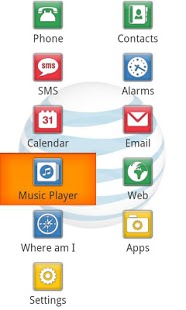
-It is a suite of 11 accessible applications (Phone, Contacts, SMS, Alarm, Calendar, Email, Web, Where am I, Apps, Music Player and Settings) which have been especially designed for the blind and visually impaired. They all have a simplified interface whose textual information is spoken using Nuance Vocalizer® voice synthesis or or you can connect your Braille display for Braille output.
-It is also a screen reader which allows you to get out of the suite and navigate the standard interface of your phone.
Please note that if you want to use the screen reader functionality of AT&T Mobile Accessibility you will need a phone with physical navigational controls such as a trackball or trackpad.
Inside the AT&T Mobile Accessibility suite of accessible applications you can do the following:
- Phone: Make calls, answer calls, hear the caller ID and manage your call log.
- Contacts: Manage your contacts
- SMS: Compose and read short messages. Manage conversations.
- Alarms: Set your alarms.
- Web: Full web browser experience, similar to what you can find on your PC. Jump by the control of your choice (links, paragraphs, headings, forms, etc.) to navigate faster to the information of your interest. Bookmark your favourite webpages.
- Calendar: Create, edit and delete a calendar entry. View all events per day, week or month.
- Email: Full access to your Gmail account.
- Where am I? : GPS application that gives you updates on your current location.
- Apps: Access the list of apps installed on your Android phone.
- Music Player: plays audio files and lists all music audio content automatically on the phone and storage card.
- Settings: Change ringtone. Configure feedback and notifications (vibration or audio). Configure keyboard echo, punctuation verbosity, speech pitch and rate, etc.
- Quick access to date and time, phone status information such as battery level and network coverage, number of missed calls and unread messages, etc.
Main Highlights:
- Touch navigation: You can use AT&T Mobile Accessibility not only with the trackball or the physical keyboard of your phone, but also with its touchscreen! Simply move your finger around the screen and the voice synthesis will read the text located under your finger. Or if you prefer, you can also swipe up/down/right/left and tap on the screen to navigate through the interface. And if you wish you can enable sound and vibration feedback.
- Easy to input text: With AT&T Mobile Accessibility suite you can use the touch qwerty keyboard as well as the speech recognition to write text quickly and easily. Imagine writing an SMS or an Email using your voice only... just great!
- Voice synthesis: Code Factory has been making mobile phones accessible to the blind and visually impaired for many years now, and we know that the voice matters... and a lot! For AT&T Mobile Accessibility Code Factory has partnered with Nuance® and Vocalizer® is therefore the voice of AT&T Mobile Accessibility.
- AT&T Mobile Accessibility features advanced Braille support. Logically assigned Braille commands provide uniform functionality across supported Braille devices.
System Requirements:
All Android phones from version 2.1 and above are supported. Please note that speech recognition is only supported with version 2.2 and above.
About AT&T Mobile Accessibility
The company that develops AT&T Mobile Accessibility is Code Factory. The latest version released by its developer is 2.09.
To install AT&T Mobile Accessibility on your Android device, just click the green Continue To App button above to start the installation process. The app is listed on our website since 2014-01-13 and was downloaded 0 times. We have already checked if the download link is safe, however for your own protection we recommend that you scan the downloaded app with your antivirus. Your antivirus may detect the AT&T Mobile Accessibility as malware as malware if the download link to es.codefactory.android.app.ma.vocalizerenuattcarrier is broken.
How to install AT&T Mobile Accessibility on your Android device:
- Click on the Continue To App button on our website. This will redirect you to Google Play.
- Once the AT&T Mobile Accessibility is shown in the Google Play listing of your Android device, you can start its download and installation. Tap on the Install button located below the search bar and to the right of the app icon.
- A pop-up window with the permissions required by AT&T Mobile Accessibility will be shown. Click on Accept to continue the process.
- AT&T Mobile Accessibility will be downloaded onto your device, displaying a progress. Once the download completes, the installation will start and you'll get a notification after the installation is finished.
Program Details
System requirements
Download information
Pricing
Version History
version 2.09
posted on 2014-01-13
version 2.05
posted on 2013-02-14
Several fixes and updates
Disclaimer
Official Google Play Link
We do not host AT&T Mobile Accessibility on our servers. We did not scan it for viruses, adware, spyware or other type of malware. This app is hosted by Google and passed their terms and conditions to be listed there. We recommend caution when installing it.
The Google Play link for AT&T Mobile Accessibility is provided to you by apps112.com without any warranties, representations or guarantees of any kind, so access it at your own risk.
If you have questions regarding this particular app contact the publisher directly. For questions about the functionalities of apps112.com contact us.
